Your students now have a Home screen
Your students land on one screen that says what is due, what came back and what you said about it, with one Up next action chosen for them. They can see what they are working on, what they have done, how they are getting on and what to act on, so keeping on top of their work and their feedback becomes something they own.
"What do I need to do?" is the question students ask at the start of every lesson, and the answer is usually on the board, in the last message you sent, or what you have already explained four times. A teacher wrote to me this month to say that one of their students had asked why the teacher side of Coding Pathway looked so much nicer than the student side. That was a fair question. The student side had grown one screen at a time, and nothing on it answered the first thing a student wants to know when they sign in: what do I need to do, and how am I doing?
Students in a school now land on a Home screen that answers both. Every part of it comes from work you have already set, so nothing on it is new information for you. What is new is that the student can see it all in one place: what they are working on, what is due and when, what came back, what you said about it and how they are getting on. That clarity is what ownership is built on. A student who can see their own situation can act on it, and a due date or a returned mark is never news to them.
What a student sees when they sign in
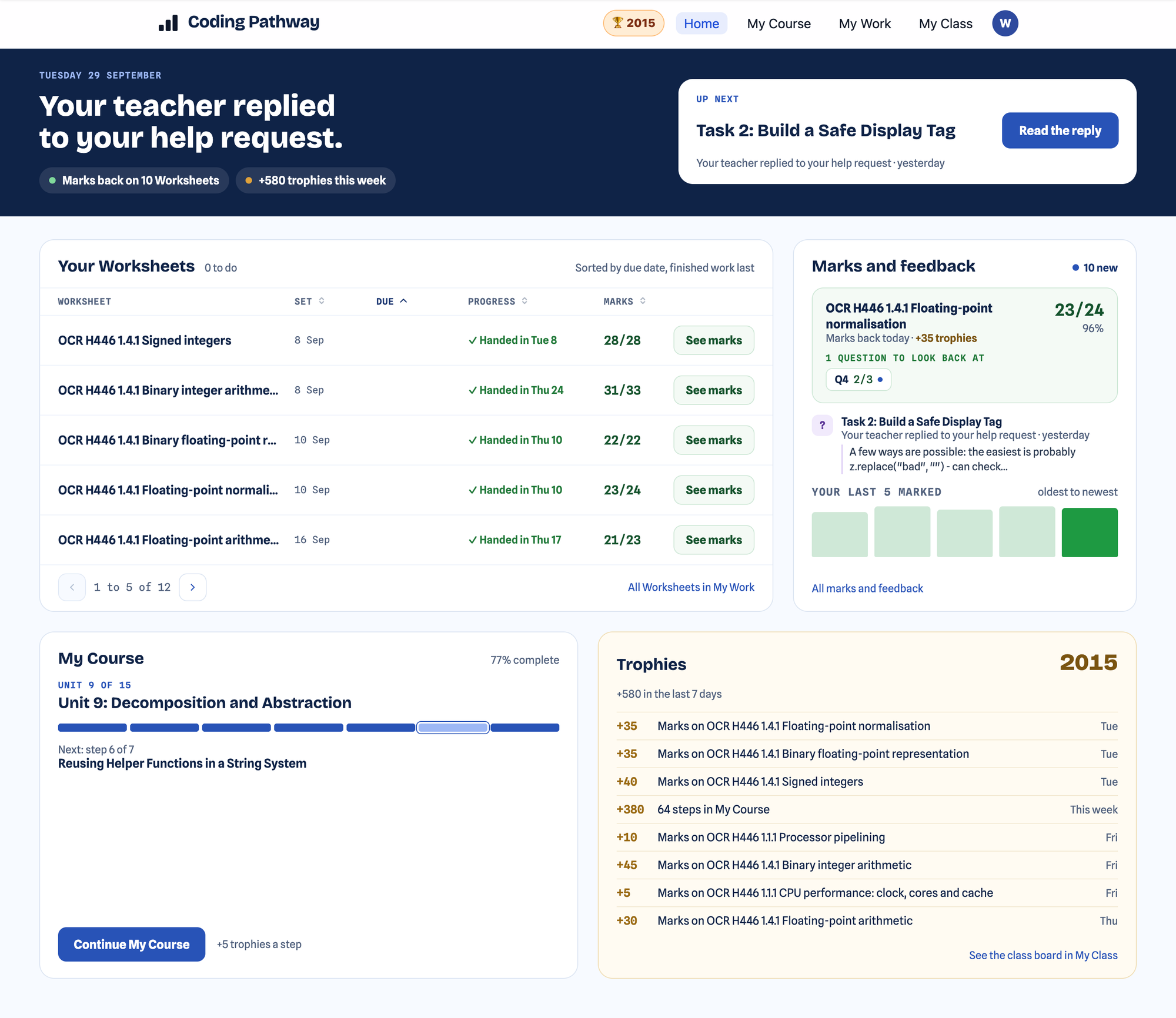
- One sentence about where they stand, and one Up next card. "One Worksheet due today, two more this week." or "Your teacher replied to your help request." Up next is the single most urgent thing, chosen for them, one click away.
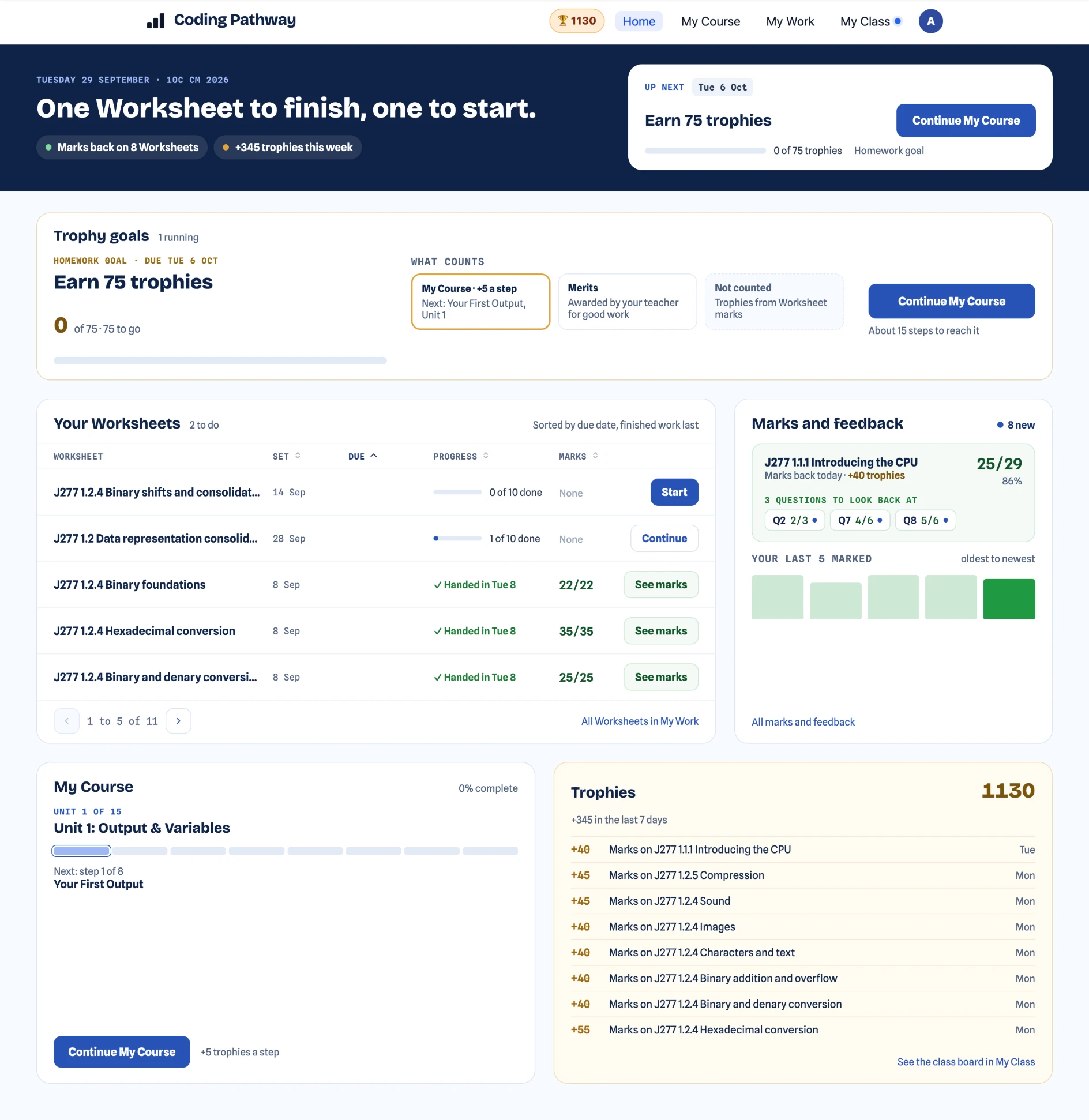
- Trophy goals, when one is live: the goal you set, their progress against it and a Continue button. Trophy goals are often set as homework, so this sits at the top of the page while it counts.
- Your Worksheets: everything set to them, five to a page, sortable by due date, when it was set, progress and marks.
- Marks and feedback: the latest return, a "New" label on marks they have not opened, any comment you have left on a question, and your reply to a help request. Their last five scores are drawn as a small chart, so a student can see their own trend for the first time, and hovering over each score shows more about it.
- My Course: where they are in the step-by-step core Python course, as a percentage, and one Continue button.
- Trophies: the total, what they have earned this week and which goals they met.
Their own progress, in their own hands
The habit I want every student to build is checking their own marks and going back to the question they got wrong, without being told to. A student who can see that Q4 was the one to look back at, that their last five scores are climbing, or that a help request has been answered, has something to act on and a reason to act on it. The same screen shows them what is due this week and what is not started, so planning homework and keeping up is their job, with the information to do it. Marks you return land here with a "New" label, so a returned Worksheet is the first thing they see rather than something they have to be sent to find. In the Year 12 example at the top of this post, the teacher's reply to a help request is quoted in full in Marks and feedback, above ten Worksheets with marks back. It works at phone width, so a student can check what is due on the way to your lesson.
Trophies for returned Worksheet marks
Returned Worksheet marks now pay trophies, so a class that does its Worksheets well sees it in the same place as the core course. When I told one of my Year 10 students this was on its way they were audibly excited, and for teachers it is another measure of progress and consistency to look at. The amount scales with the marks available on the Worksheet, roughly in line with a lesson on the core course, and it only ever goes up: returning a second round of marks tops up the award rather than taking anything away. The send-to-class confirmation box has an "Award trophies for this Worksheet" checkbox, on by default, if you would rather a particular piece of work did not count. Worksheet trophies do not count towards trophy goals, so a goal you set on the core course still means what it meant.
What changes in your classroom
Due dates, hand-in state and returned marks are on the student's screen before you say anything, and the Up next card takes them to the right place in one click. The Worksheets list is the part I expect to matter most. It tells a student plainly which Worksheets are not finished, and I have a few students with one or two left unfinished who will now see that every time they sign in. I believe students will be more likely to complete their Worksheets because of it. When you reply to a help request, the reply is the first thing that student sees on Home, quoted in full, rather than a notification they have to open. The conversation I want at the start of a lesson is "I have looked at my marks, can you go over Q4?", and Home is built to make that the normal one.
Home is for students in a school. Students using the free course on their own, and teacher accounts, land where they did before, and My Course is still there in the menu for everyone.
Smaller changes on the student side
- Students are asked to confirm before removing one of their own pieces of work, so a slip no longer loses work.
- Large output images from a run, such as a photo opened with
Image.show(), now display in full with a link to open them at their real size.
Set a Worksheet, and your students see it due on Home. Return the marks, and they see them there with a "New" label and your note beside the question. Reply to a help request, and the reply is waiting for them the next time they sign in. Students get a clear picture of their own work and progress, and the responsibility for acting on it. If Home is missing something your students ask for, tell me and I will add it.