Teach it live, on every student's screen
Go live in a lesson and model code straight onto every student's screen in real time. They follow along read-only, you can leave questions right in the code, and when ready they can copy it into their own workspaces and complete work.
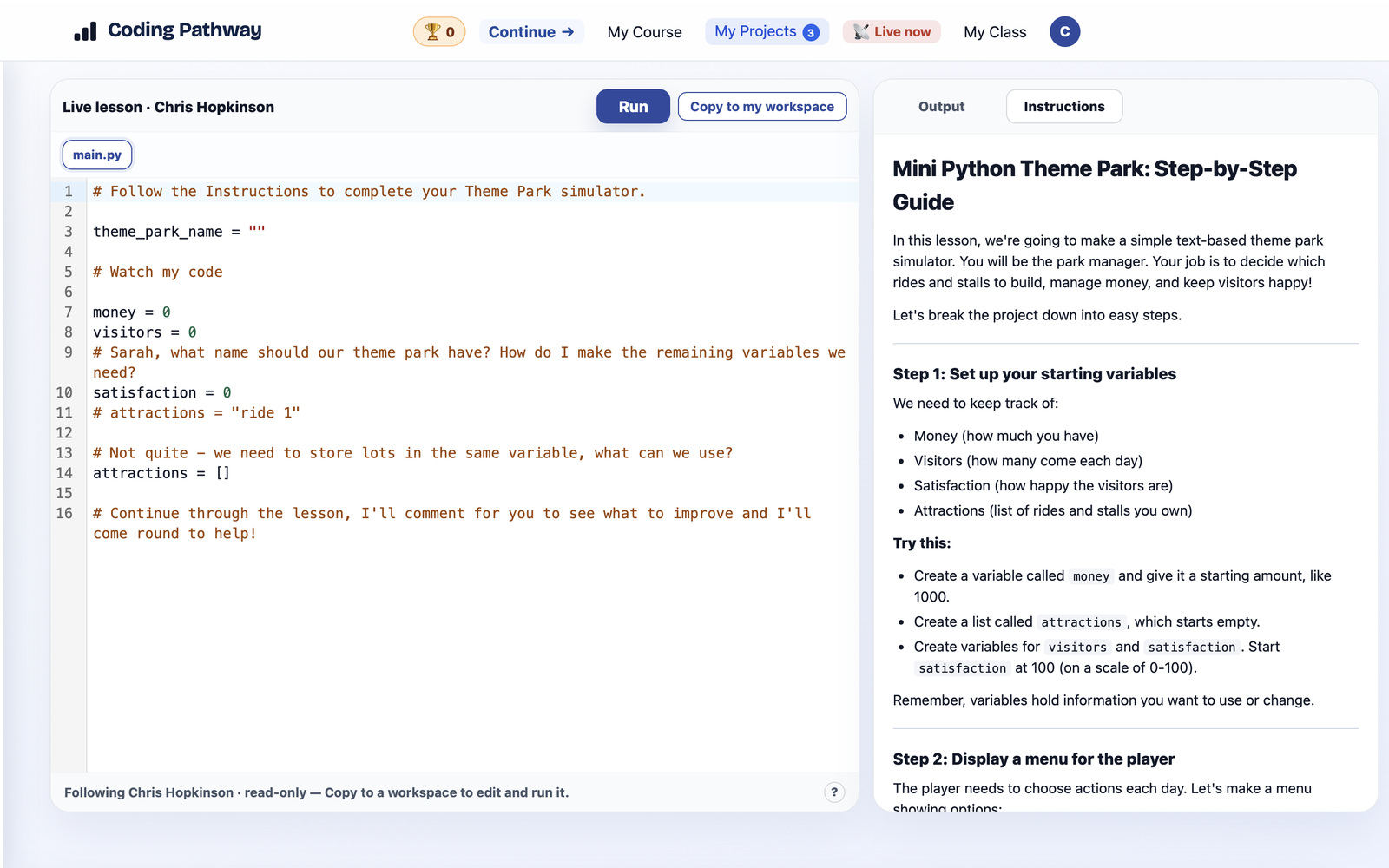
Modelling code at the front of the room usually means a big screen, a lot of squinting, "what did you type on line 8?", and students beginning their own work with a blank page. Live lessons replace that. You model code once, and it lands on every student's screen at full size, in real time.
Open a lesson you have already built, choose who can see it, and click Go live. Every student in scope gets a live notification and opens a read-only view that mirrors your editor as you type. They watch you build the code, line by line, on their own screen.
Talk to the class through the code
- Ask a question where they are already looking. A comment like
# what should we call our theme park? how do I make the rest of the variables?sits in the code every student can see, so the prompt lands where their attention already is. - Model the thinking, not just the answer. Show a wrong approach, leave a nudge, then correct it. Students watch you reason, you can question more freely, which is the bit a finished example on a board never shows.
- Instructions travel with it. The lesson's instruction file sits alongside the code, so a student who wants the written version has it right there.
Then they carry on in their own copy
Following along read-only is only half of it. When a student is ready, they click Copy to my workspace, and the whole thing, code and instructions included, becomes their own editable copy. They pick up exactly where you left off, in their own editor, instead of re-typing from a board.
Why it helps in a real classroom
- No installs, no links to share round the room. It is all in the browser. You go live, they get a notification on their Coding Pathway account, and they are following within seconds.
- Every screen at native size. No projector to squint at, and no "what did you type?", because they are looking at your actual editor.
- They leave with something that runs. Each student ends the lesson with their own working copy to build on, not a photo of a whiteboard.
This has been quietly in use for a while, and enough has settled down that it deserves its own note rather than a line in a larger update. Get in touch if you would like a hand setting up your first live lesson.