Trinket is closing. Here's what to move to.
Trinket served UK computing classrooms brilliantly for years, and its closure in August 2026 leaves a real gap. Coding Pathway covers everything you used Trinket for: browser Python, sharing code by link, live demos. And it adds the teacher layer Trinket never had.
Start with a free two-week trial of everything, and keep a free plan afterwards, so you can move your teaching over and test it properly before spending anything.
Everything you did in Trinket works here.
The same, turtle included. Every student gets a persistent workspace, so the code they write in Tuesday's lesson is still there on Thursday.
Lessons share by link the same way. Paste one into a worksheet, a slide deck, or a teaching community, and any teacher or student who opens it gets their own editable copy.
Live broadcast: students watch your code update in real time on their own screens, then copy it into their own workspace with one tap and carry on.
Share a lesson as a resource students can return to any time. When something genuinely needs a deadline, set it as work with hand-in tracking instead.
Links rather than embeds: put a lesson link wherever you put trinkets before. Students click through to their own copy instead of running code inside the page.
Lessons live in your library permanently, and they share with colleagues and other schools, so the good version outlives any one timetable.
One honest difference: Trinket let students run code without signing in. On Coding Pathway, students sign in with their school Google or Microsoft account. It is one click and there are no new passwords, and it is the reason their work persists between lessons and you can see who is actually coding.
What Trinket never had: a teacher layer.
The biggest difference isn't the editor; it's what you can see. Trinket showed you your code. Coding Pathway shows you your class.
See the whole class coding
A live view of every student's workspace: who's active, who's stuck, who's gone quiet, without leaving your desk.
Review code without collecting files
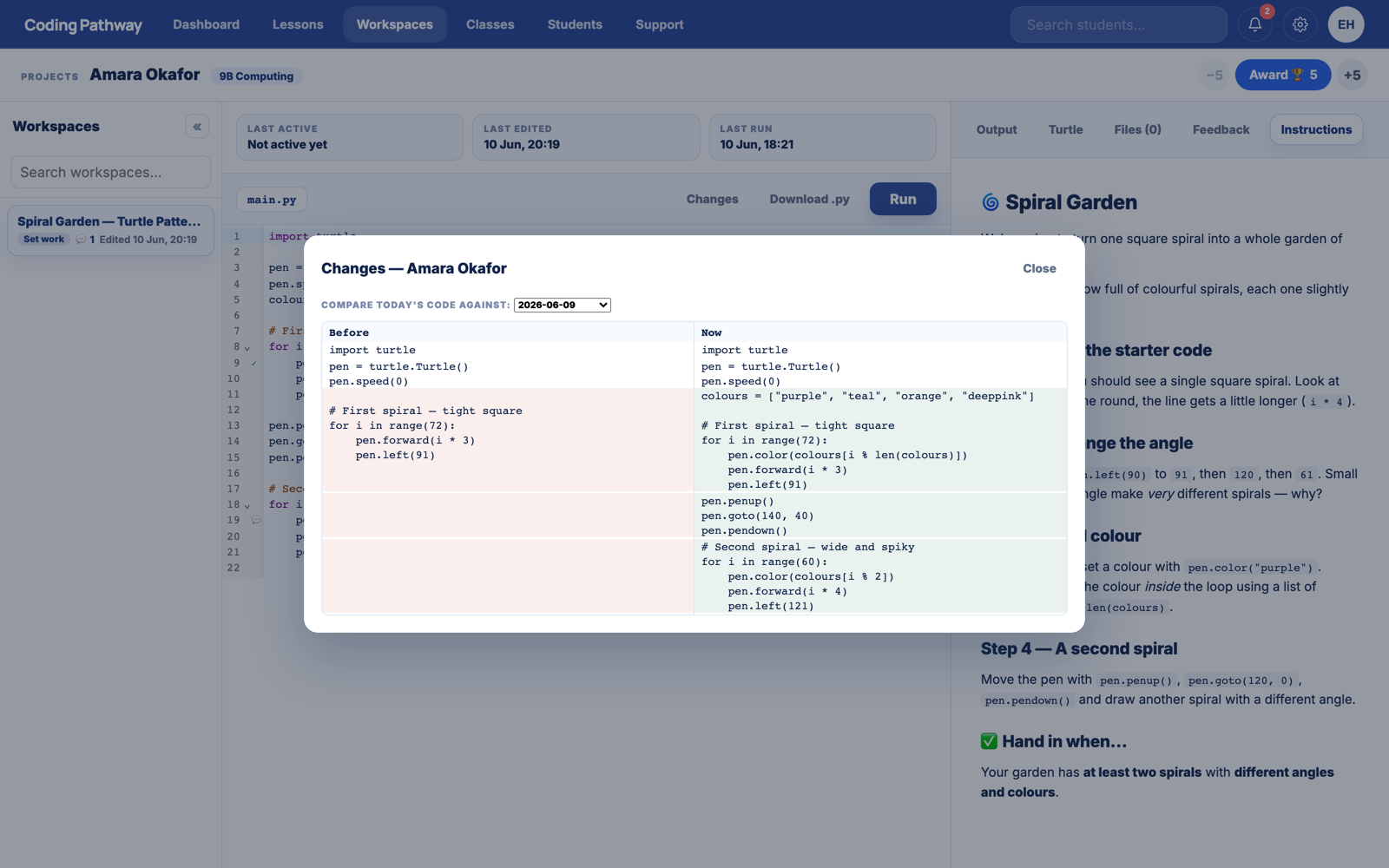
Move student-to-student with one key, pin comments to exact lines, see what changed since yesterday, and award trophies for good work.
A full Python curriculum underneath
A structured, guidance-first pathway from first print statement towards GCSE, with automatic checking and visible progress.
Built for UK schools
Google/Microsoft SSO, school-scoped data, UK GDPR-aware handling, and no student-facing AI anywhere on the platform.
What about your existing trinkets?
Before Trinket closes, download your work from Trinket's Account Settings (“Download All Trinkets”). Any Python file can then be pasted straight into a Coding Pathway lesson or workspace. For most teaching code, that is the whole migration. Your live-demo and share-a-link workflow carries over as it is; you gain visibility and code review on top. If you would like a hand moving over, or a walkthrough first, get in touch. You will be talking to the teacher who built it. And if you are weighing up options more broadly, the Python IDE for schools page covers what to look for in any browser editor for the classroom.
Have questions before setting up an account?
Send us a message and we'll review it as soon as we can.