A Python IDE built for schools.
A real Python editor in the browser. Nothing to install, nothing for IT to manage, and the teacher layer built in from the start. Students sign in with Google or Microsoft and write, run and save real Python from any school machine.
Free to try with a class today. Set up takes about ten minutes, and you will be talking to the teacher who built it if you need a hand.
The problems it solves.
Most Python lessons do not go wrong at the teaching. They go wrong at the plumbing: lost work, invisible classes, marking by email attachment. This is the plumbing, fixed.
Work that vanishes or goes missing
Everything autosaves as students type, and every student's workspaces live in one place, named and dated. No lost files, no USB sticks, no "it worked at home". Students always know where their work is, and so do you.
A class you cannot see
A live view of every student's workspace: who is active, who is stuck, who has gone quiet, without leaving your desk. It is your walk around the room, from the front of it.
Marking that means collecting files
Review in place, student by student, with one key to move between them. Pin a comment to the exact line; students reply and mark it done. No downloads, no email attachments.
Distributing activities is a faff
Send a lesson with instructions and starter code to the whole class in one click. Everyone opens the same thing, ready to run, and it is still there next lesson.
Installs, versions, and reliability
Runs fully in the browser on Windows, Chromebooks, Macs and iPads. No local interpreters, no version drift between rooms, one URL for IT to allowlist. Students sign in with Google or Microsoft, so there are no new passwords.
Error messages that scare beginners
Friendly errors explain what went wrong in plain English, point at the line, and suggest what to try next, with the real Python error still there to learn from.
A proper editor, not a toy.
Students get a real editor with real error output and the libraries that make lessons worth teaching: Turtle graphics, Processing-style interactive sketches, Matplotlib charts, and GCSE-style file handling with open, read, write and append. Code they can see the results of, in the same window.
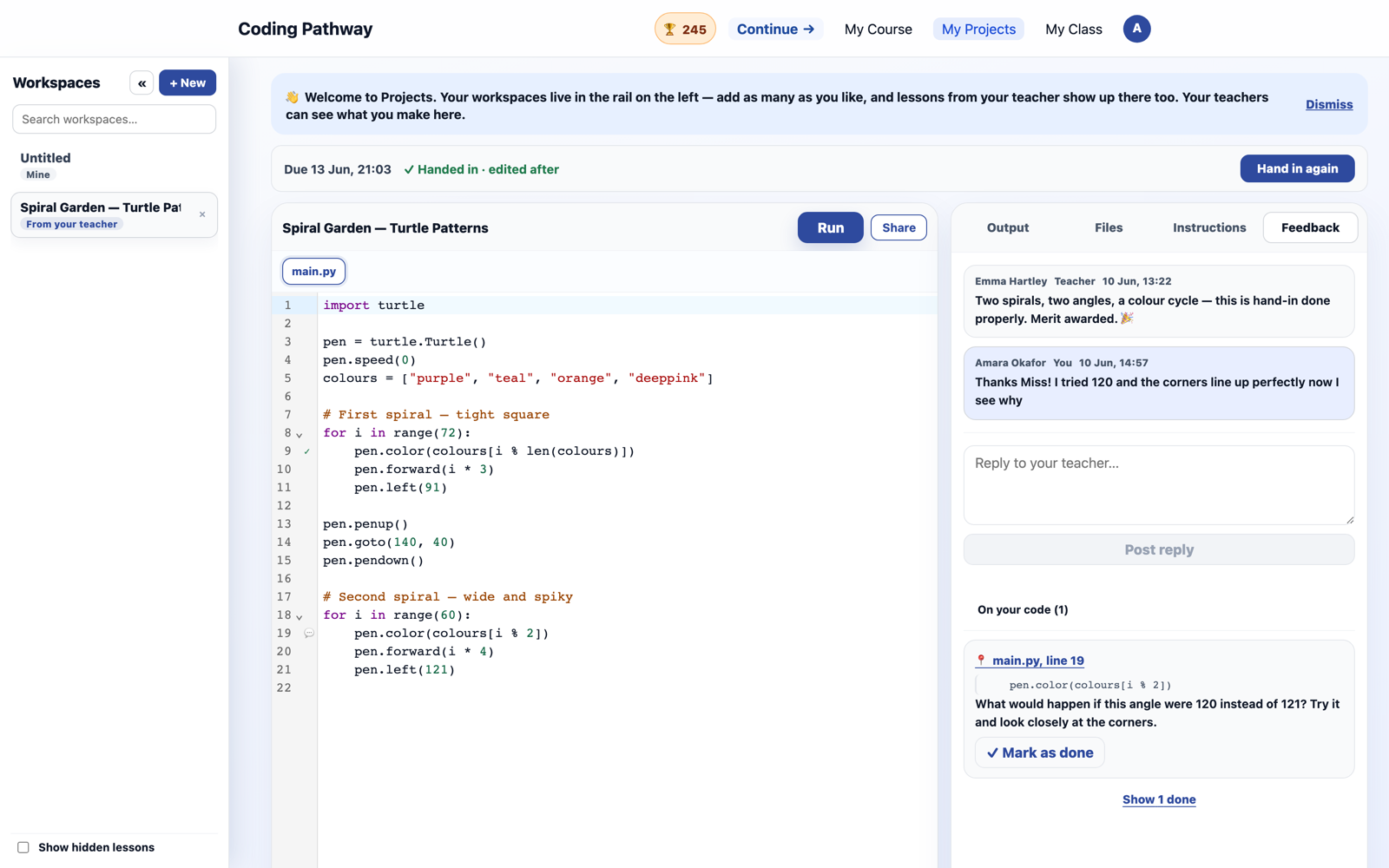
A lesson with it looks like this.
Go live and model the starter on every student's screen as you type. Hand it over: students copy your code into their own workspace in one click and build on it. Circulate from your desk with the live class view, drop a comment on the exact line where someone is stuck, and close the lesson with a trophy goal for homework. Next lesson, the board shows who did it.

The live lesson flow has its own guide: run a live modelling session.
Safe by design.
- No student-facing AI, anywhere on the platform.
- UK GDPR-aware data handling, school-scoped from the ground up.
- Google and Microsoft single sign-on. No new passwords.
- Students join through class links their teacher approves.
The detail lives on the security and privacy pages, written for the colleague who has to sign it off.
A full Python course, free for every learner.
The IDE sits alongside a step-by-step Python course that is free for any learner, running from a student's first line of code towards A Level. Structured practice when you want it, open-ended building when you don't. See Python for GCSE Computer Science and the curriculum.
What teachers ask first.
Does it work on locked-down school networks?
Yes. It runs entirely in the browser over HTTPS with one domain to allowlist. No local installs, no special ports, nothing for technicians to package.
Do students need email addresses or new accounts?
Students sign in with their school Google or Microsoft account. No separate accounts are created and there are no new passwords to forget or reset.
Which devices does it support?
Anything with a modern browser: Windows, Chromebooks, Macs and iPads. If the machine can open a web page, it can write and run Python.
Can students use Turtle and graphics libraries?
Yes. Turtle graphics, Processing-style interactive sketches and Matplotlib charts all run in the browser, with the output beside the code. GCSE-style file handling with open, read, write and append works too.
Is it free?
The step-by-step Python course is free for any learner. The full school platform, including the IDE, class workspaces and teacher tools, is free to trial, with annual school tiers from £250 on the pricing page.
Who builds it?
A serving UK Head of Computer Science, and it is used daily in over a hundred UK schools. Improvements come from classroom use and teacher feedback.
Put a class on it this week.
Set up your school, share a join link, and your class is coding in the browser inside one lesson. If you would rather see it first, book a walkthrough: you will be talking to the teacher who built it and uses it every day.
Have questions before setting up an account?
Send us a message and we'll review it as soon as we can.