On this page
The programme lead releases activities to participating classes. Your class view shows which activities are available and how far each student has got.
Find your linked class
Open Programmes and choose the card with the course name and your class. If the class is missing, ask the programme lead to check its enrolment.
See what students can open
Under Released course, check which activities are available to this class. Choose Open the course to read a released activity when this option is available. If the next activity is missing, check with the programme lead, who controls its release.
Review a student’s work
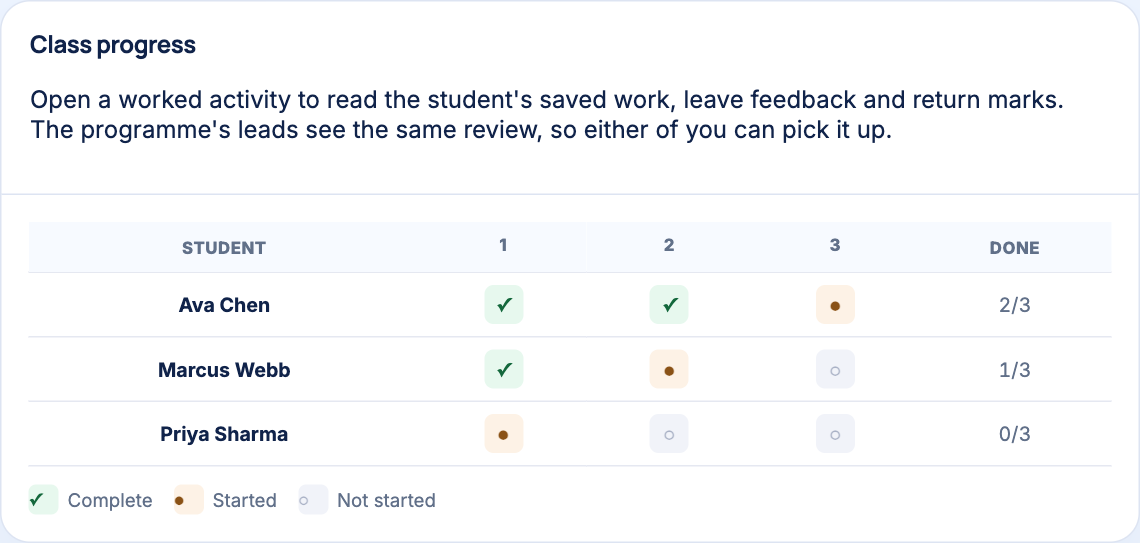
- Under Class progress, find the student's row and the activity column. A hollow circle means unstarted, a dot means started, and a tick means complete.
- Open a started or completed activity to see the student's saved work or progress details.
- Where marking is available, check whether a colleague has already reviewed the work. Return your marks and feedback when ready.
 Enlarge image
After a programme ends, new hand-ins close. You can still open Programmes to review students’ existing work. For assignments you set through Lessons, use the class progress matrix.