Handle help requests between lessons
Students raise a hand from inside the task. You reply from a queue that shows their code, their error, and the task itself, with an AI-drafted reply if you want one.
Coding homework fails quietly: a student gets stuck at 7pm, nobody is there, and they stop. Help requests are the answer.
How students ask
When a student is stuck on a task, they can ask for help without leaving it. The request captures their message, their current code, and the task. No more context-free "it doesn't work" emails.
How you answer
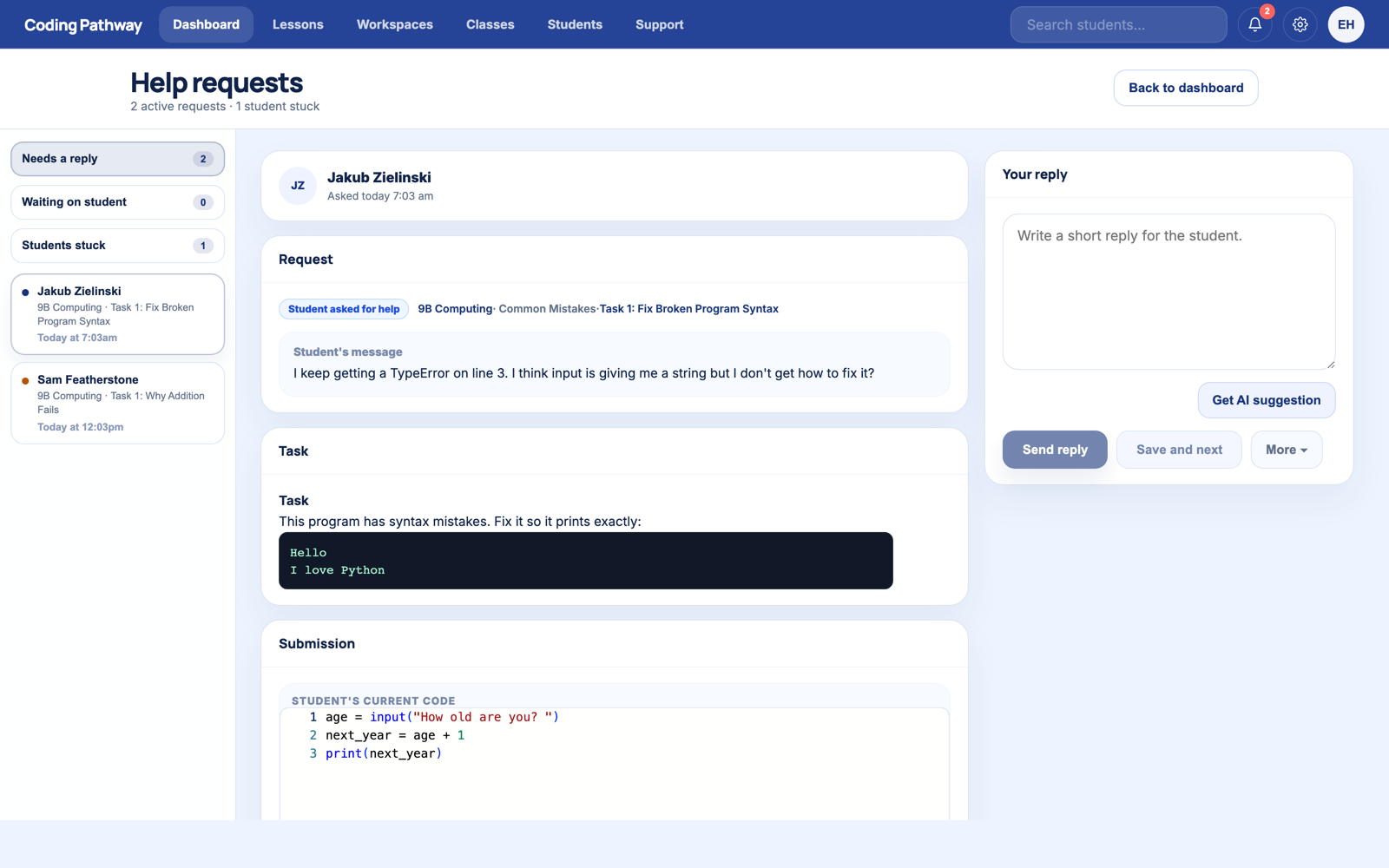
Help requests on your dashboard collects every request into a queue. Open one and everything is in view: the student's message, the task they were attempting, and their current code exactly as they left it.
Write a short reply and send. The student sees it next time they are on the platform, attached to the exact task they were stuck on.
The AI draft (teacher-only)
Get AI suggestion drafts a reply from the student's code and the task. It usually spots the actual issue and suggests a nudge rather than an answer. You review it, edit it, and decide. Nothing reaches a student without you sending it, and students never interact with AI on Coding Pathway.
Students who don't ask
The same queue surfaces students who are stuck but have not asked: repeated failed attempts on the same coding task with no success. You can offer help before they sink.
Two minutes with the queue each morning catches most of what used to surface three weeks later as "I don't get any of this."