On this page
The Units and Steps views include Python practice students do independently as well as practice you set for classwork or homework.
See the class by unit
- Open Classes, then your class.
- Choose Progress matrix and Units.
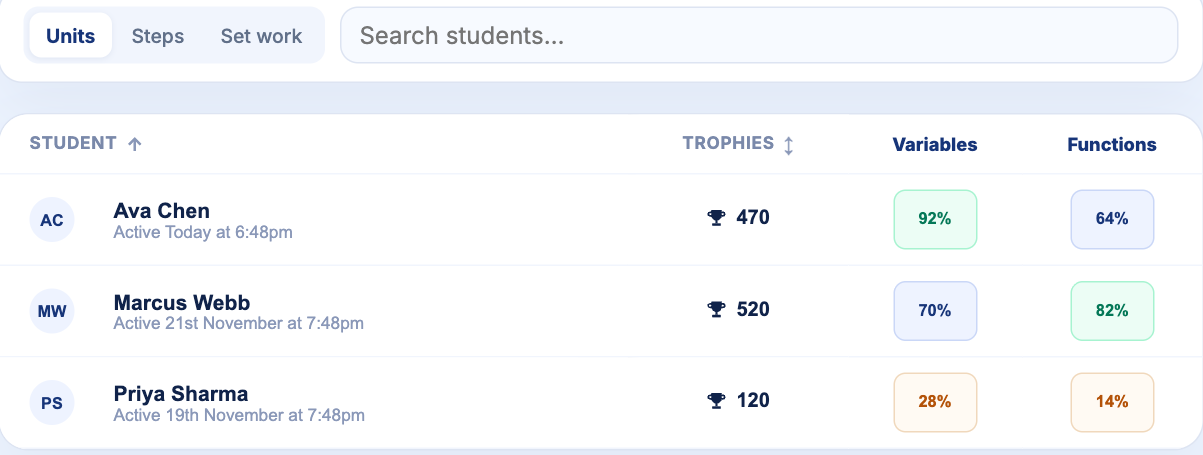
- Compare students' progress through the course units.
- Select a student's cell to inspect that unit and the available actions.
Each percentage shows how much of that unit the student has completed. If several students have further to go in the same unit, switch to Steps to see which activities they still need to practise.
 Enlarge image
Look at individual steps
Switch to Steps. Open the All units list and choose the unit you are teaching to narrow the columns to its activities. Open a relevant cell and use Open step to see the course task, or Open student for the student's wider record.
For example, two students may have completed the same percentage of a loops unit. The Steps view shows whether they have reached the same activity. Open that task before deciding whether to model it for the class or follow up with one student.
Set the next action
- Set a trophy goal for further course work.
- Review help requests if students have asked for support.
- Reset a unit if a student needs a fresh attempt at previously completed work.
Students can look back at an earlier topic without resetting their progress.
For Worksheets, Workspaces and other assigned work, switch to Set work and follow read class results and follow up.