On this page
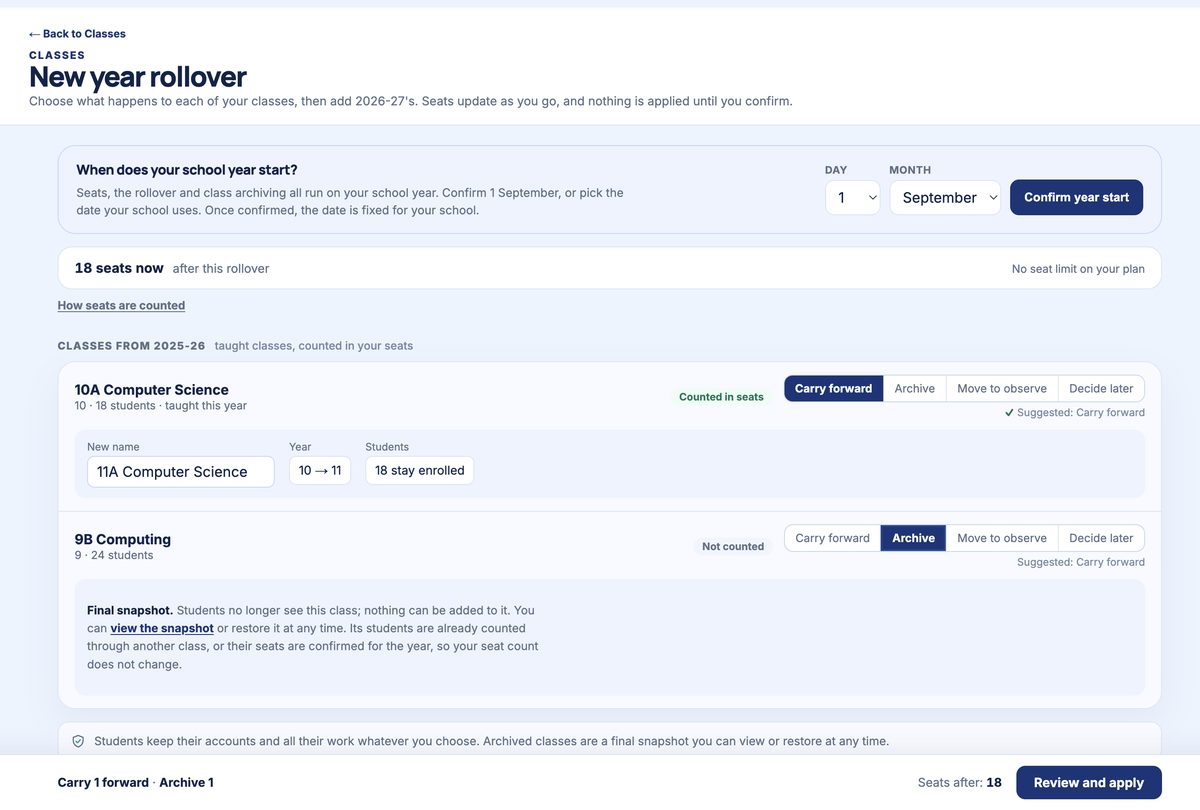
Use New year rollover to review your teaching groups together. To change a single class during the year, use Class management in Classes.
Choose what happens to each class
| Choice | When to use it |
|---|---|
| Carry forward | You will teach the same group next year. Check its proposed name and year group. The students stay enrolled. |
| Move to observe | Students will practise independently. You can see the register, trophy counts and last activity. Promote the group to active when you need to assign work, see detailed progress or review answers. |
| Archive | The class has finished. You can still view its record and restore it from Class management. |
| Decide later | Leave this class as it is. This is useful for a class you have already prepared for the new year. |
Students keep their own accounts and work. For classes already in Observe, decide whether to keep observing, promote to active or archive them.
 Enlarge image
Check the plan
For example, carry this year’s Year 10 forward as Year 11 to keep its register together. Add a new Year 10 for the incoming students. If both groups have the same proposed name, change one before you apply the plan.
Choose Review and apply. Look at the proposed changes and the seat estimate. Preparing a class does not use seats. Seats already used stay counted until your school’s academic-year boundary. School billing and seat usage explains when paid teaching uses a seat.
Apply and confirm
Choose Apply rollover when the plan is correct. Changes take effect when you apply them, including when you prepare for the year early. Read the result for each group and follow up on any item that could not be applied.
Open Classes and check the group names and year groups. For a new class, invite and approve its students before setting the first lesson.